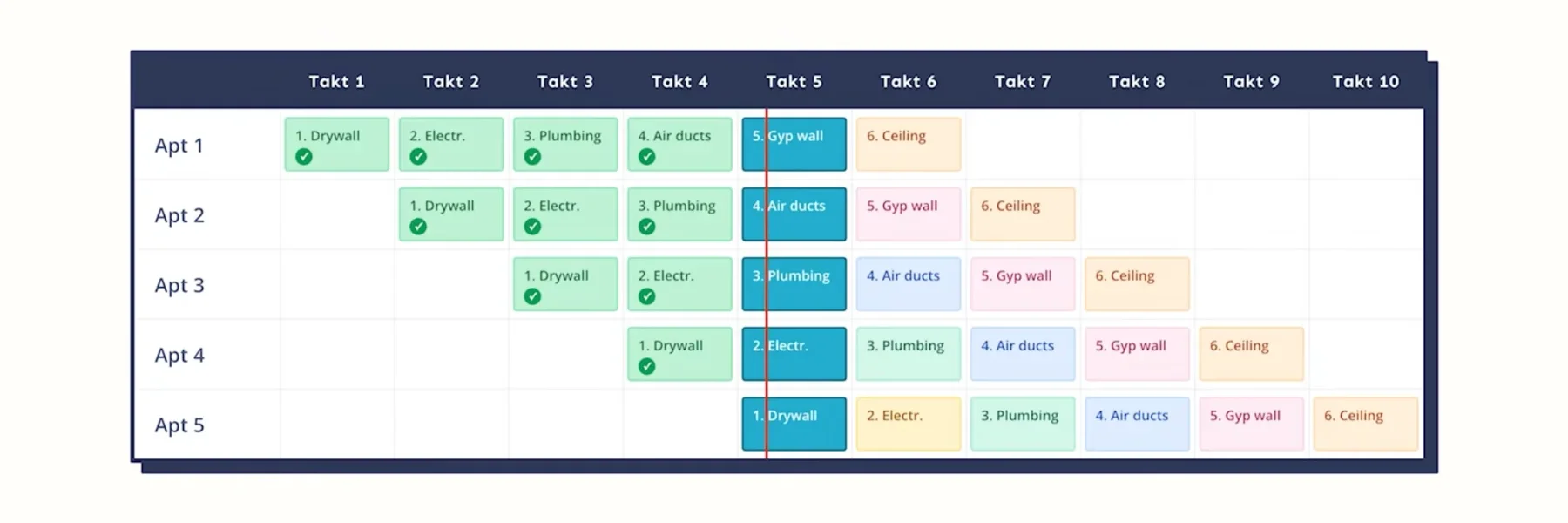

Every construction project starts with a schedule, yet many still finish late and over budget, with trades getting in each other’s way. Takt time planning changes how the production phase is scheduled. Each trade knows which area it works in, on which day, and whether that area is ready. The video below walks through it in three minutes.
Why Gantt schedules struggle in the production phase
Most projects are scheduled with the Critical Path Method and shown as a Gantt chart. It is a quick way to draft a project and see the big picture, and a Gantt schedule can be drawn at a very fine level of detail.
Where it falls short is the production phase. Picture a painter arriving on site on a Monday morning. The painter needs to know which area to work in today, whether that area is on schedule, and whether there is a free space to work in. A Gantt chart of activities rarely answers that at a glance.
How a takt schedule is built
Takt planning is a detailed planning method that stays easy to read and manage on site. A takt schedule is a grid built from two decisions.
The takt length is the time each trade spends in one area. The takt area is the part of the building it works in. In the video’s example, the takt length is one day and the takt area is a single apartment.
Next you set the dependencies between tasks. We call these the wagons. In practice this is like drawing a Critical Path Method schedule for one apartment, then repeating it in every apartment in the project.
Every project has a natural order of work and tasks that depend on each other. When those dependencies are visible in the schedule, each trade can pull its work from the trade before it. For the basics of takt time itself, read the takt time guide.
From Excel to Taso Planner
Excel has long been the usual tool for takt. It is fast and works well for a first draft. Taso Planner builds the same schedule faster.
- A new project starts from a template, and teams and activity libraries connect in minutes.
- When the schedule changes, every level of it updates at once, with no spreadsheets to fix by hand.
- Trades are resourced by entering quantities and using ready-made activity templates.
Some phases of a project run best in takt and others in Gantt. Taso Planner shows both in the same schedule, so the site works from one plan.
A schedule only works if people can read it
In Taso Planner every task is one clear step. Team leads see their crew’s work on their phone, along with the status of the trades before and after them. The superintendent sees the whole site in one view in real time, which means fewer phone calls and more time to run the job.
Every finished task leaves a record
Each completed task records what was done, where, by which crew and when. You use that record to plan the next floor and the next project.
Getting started with takt
You can learn takt on your own. Our team has experience from about 200 projects, so the first steps go faster with people who have done it before. Book a free demo and we’ll talk through how takt would work on your next project.
Next: how to get trade contractors committed to the schedule, in Getting trade contractors committed to the takt schedule.